

HubSpot onboarding is often treated as a simple platform setup that includes configuring the CRM, importing contacts, creating a few pipelines, and training the team. But for automation-heavy teams, this approach is rarely enough.
Marketing and revenue operations teams typically need HubSpot to work as part of a wider system and the right HubSpot CRM onboarding services should go beyond getting your portal live. They should help you build a HubSpot environment that can support your processes now and scale as they become more sophisticated.
In this WeSimplifi guide, we’ll compare four HubSpot onboarding providers and help you select the right partner based on your needs.
What Should HubSpot Onboarding Services Include?
The scope of HubSpot CRM onboarding services can vary depending on the provider you choose. At a starting level, they will help your team learn the basic HubSpot setup and how it will work around your immediate business requirements.
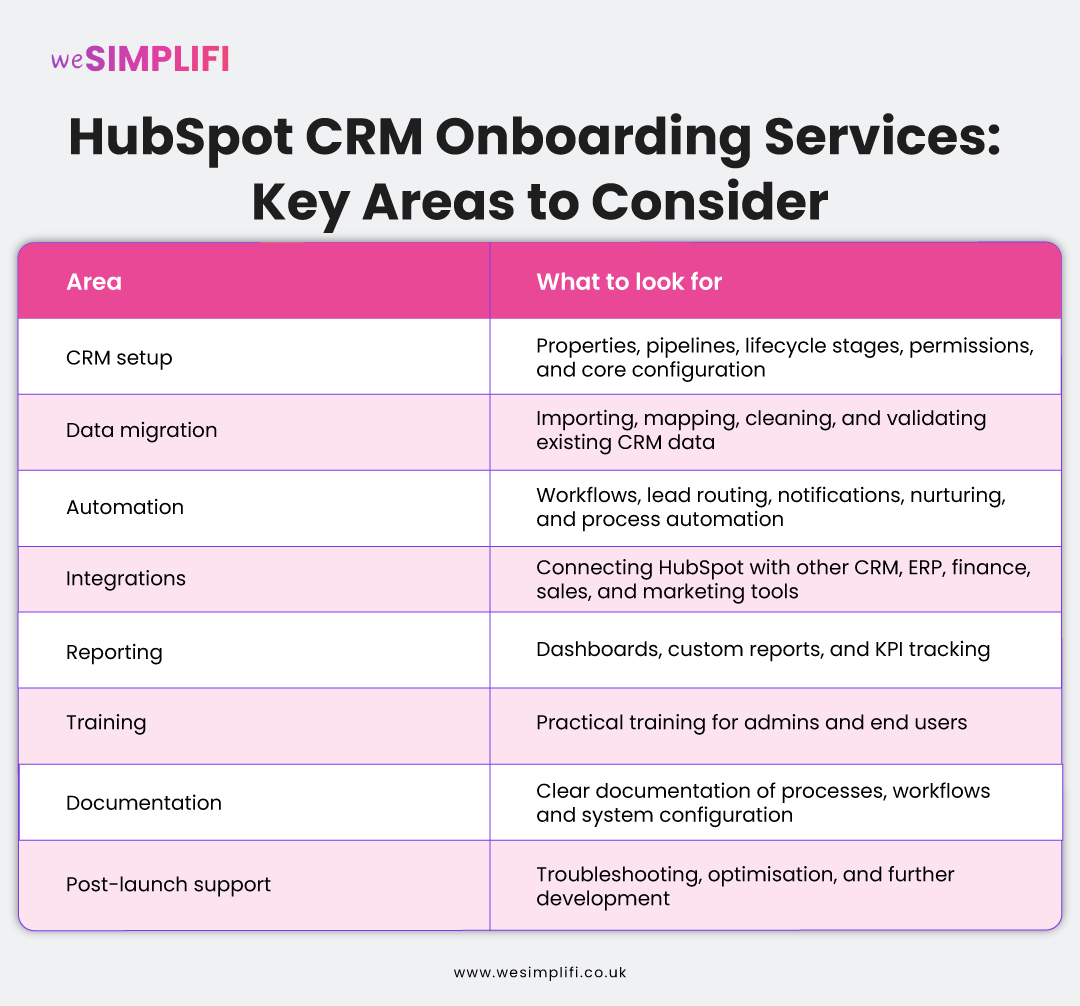
For an automation-focused team, the scope of this project goes a bit further. A well-rounded HubSpot onboarding project for Automation teams can include:
What Makes a HubSpot Onboarding Partner Good for Automation Teams?
A good HubSpot Onboarding Partner will act as a bridge between your technical goals for automation and your business reality. They will help automation teams through their:
Automation and Workflow Expertise
They understand your processes before starting to build workflows. For this, they identify suitable opportunities for automation across lead routing, nurturing, notifications, task creation, and sales handoffs. They will make your processes more efficient without creating unnecessary workflow complexity.
Integration Capabilities
Automation often depends a lot on how well HubSpot connects with the rest of your tech stack. An onboarding partner understands this and helps you with their experience with native and custom integrations, data synchronisation, field mapping, and API connections.
CRM Architecture and Implementation
A good HubSpot CRM onboarding partner knows that effective automation starts with a well-structured CRM. That’s why they understand your properties, pipelines, lifecycle stages, permissions, data structure, and reporting before adding any workflows.
Best HubSpot Onboarding Services for Automation Teams
There is no single provider that will be the right fit for every automation team. The right choice will depend on your portal complexity, integrations, internal expertise, and how much support you need after launch.
Here are four HubSpot Onboarding Services providers that are worth comparing for automation teams:
1. WeSimplifi
WeSimplifi combines HubSpot CRM onboarding with HubSpot implementation, workflow automation, integrations, and RevOps support. This is suitable for automation-heavy teams, because onboarding does not have to stop at basic portal configuration.
WeSimplifi also offers comprehensive onboarding services including technical configuration, data migration, personalised training, and ongoing support.
Best fit: Teams looking for onboarding, automation, and CRM operations support within the same engagement.
2. Huble
Huble is a global HubSpot consultancy that serves mid-market and enterprise organisations. It offers HubSpot onboarding, CRM implementation, custom API integrations, programmable automation, Revenue Hub implementation, and training.
It also features a dedicated Ops Hub offering data synchronisation, data quality automation, datasets, and programmable automation.
Best fit: Mid-market and enterprise teams with complex systems, data requirements or multi-team HubSpot deployments.
3. BBD Boom
BBD Boom provides HubSpot onboarding alongside custom implementation, CRM migration, integrations, training, and ongoing portal support. Its onboarding process includes discovery around business processes and customer journeys, CRM customisation, data migration, and integrations, followed by automation, reporting, and segmentation.
For automation teams, they treat automation as part of their broader onboarding process rather than treating it as an isolated technical task.
Best fit: Teams that want a structured onboarding process covering CRM configuration, automation, and user enablement.
4. AutomateNow
The HubSpot services of AutomateNow are centered around complex HubSpot implementations, migrations, RevOps alignment, system integrations, and customer journey automation. It also describes ongoing client relationships focused on adoption rather than setup alone.
This makes it relevant for established teams that already have multiple processes or systems to bring together.
Best fit: Established teams looking to connect HubSpot more closely with their sales, marketing, service, and operational processes.
You can also check our HubSpot Implementation Partners Comparison Guide to learn what you should expect from your CRM implementation partner.
How to Compare HubSpot CRM Onboarding Services
Now that you have a list of providers to choose from, let’s see how you should evaluate their HubSpot CRM onboarding services based on your business requirements.
1. Assess Your Automation Requirements
Start by identifying which processes you want HubSpot to manage or automate. You can do this by considering where your team currently spends time on manual tasks, lead handoffs, notifications or data updates. This gives your potential partners a clear understanding of your requirements including your sales and marketing automation setup.
2. Review Integration Experience
Look beyond whether a provider simply offers integrations. Ask about their experience in connecting HubSpot with the specific platforms that your team uses. A capable partner should understand data mapping, synchronisation, and how information moves between systems.
3. Check CRM Implementation Capabilities
Automation depends on a well-structured CRM. Review how the provider approaches setting up properties, pipelines, lifecycle stages, permissions, and data structure before workflows are built. This helps to prevent automation from becoming a workaround for your underlying CRM problems.
4. Evaluate Training and Knowledge Transfer
Your team should understand how the new HubSpot processes work once onboarding is complete. Ask what training is provided for CRM admins and end users, and whether they provide documented workflows and key CRM processes.This makes it easier for your team to manage routine changes independently.
5. Understand Post-Launch Support
HubSpot onboarding services do not necessarily end when the portal goes live. Ask what support the partner offers for changes in workflows, integration issues, troubleshooting, and ongoing CRM automation optimisation. This is particularly important for teams relying heavily on sales and marketing automation setup as your processes and system requirements both change as the business grows.
6. Look at Proven HubSpot Experience
Consider the provider's relevant HubSpot experience rather than relying only on general partner credentials. Look for evidence of work involving CRM implementation, automation, integrations, data migration, and CRM consulting services. Case studies, certifications and examples of similar projects can help you determine if their experience matches your requirements.
HubSpot Onboarding vs. HubSpot Implementation
While the terms HubSpot Onboarding and HubSpot Implementation are often used interchangeably, they describe different scopes of work.
HubSpot onboarding generally focuses on getting your team and portal set up so you can start using HubSpot effectively. HubSpot implementation can involve a broader redesign or configuration of how HubSpot supports your business processes.
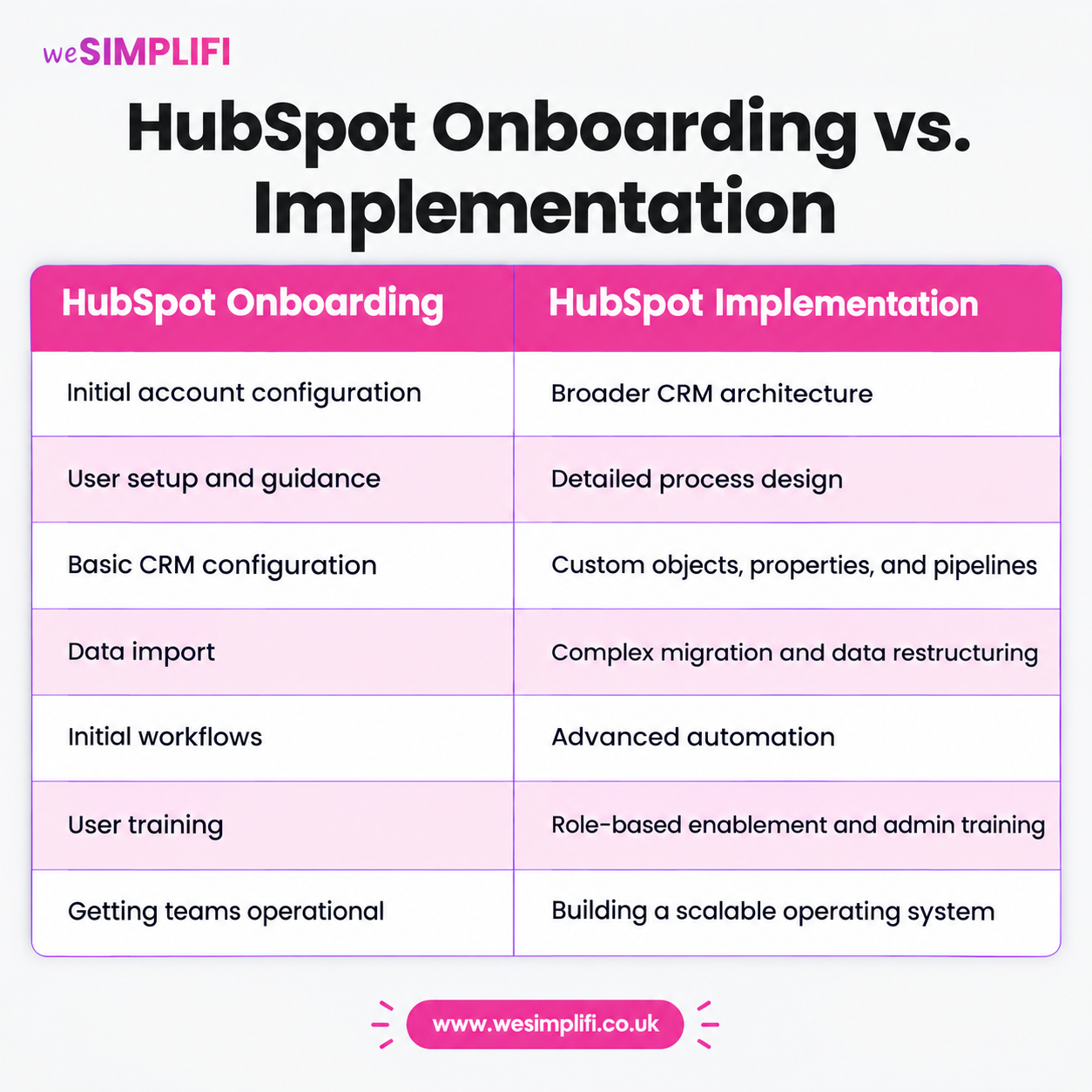
While there can be a significant overlap between the two services, the main difference lies in their scope and project complexity.
Common Mistakes to Avoid When Choosing a HubSpot Partner
While comparing HubSpot Partners, you should avoid making some common mistakes, including:
-
Choosing a partner based on their onboarding price alone
A lower initial price may not represent the full cost if your team later has to rebuild workflows, correct data problems or pay separately for integration work.
-
Automating before fixing the process
A partner should understand your process before designing workflows as automating an inefficient process will only make it worse.
-
Treating integrations as an afterthought
If HubSpot needs to exchange information with other platforms, including payment portals or RevOps systems, discuss your integration requirements at the beginning of the project.
-
Ignoring data architecture
Poor property structures and inconsistent lifecycle definitions can create problems across automation, reporting, and segmentation.
-
Underestimating training
A technically successful implementation can still struggle if the users do not understand the new processes.
-
Not discussing post-launch ownership
Before signing, establish who will maintain workflows, troubleshoot integrations, and make future changes.
Questions to Ask a HubSpot Onboarding Provider
Before choosing a provider for your HubSpot Onboarding, ask questions like:
- How would you document our existing processes before configuring HubSpot?
- How much automation is included in the onboarding?
- Can you build custom workflows and programmable automation?
- Which integrations have you implemented before?
- How do you approach data migration and validation?
- Who will own the CRM architecture decisions?
- What training will our CRM admins and end users receive?
- Will we receive documentation for workflows and integrations?
- What happens when a workflow or integration fails after launch?
- What ongoing support options are available?
- Can you help with optimising our portal after HubSpot onboarding is complete?
- Can you show us a relevant implementation or case study?
These questions will bring you closer to choosing the right onboarding partner for your business.
How Much Support Does Your Team Need after HubSpot Onboarding?
Although HubSpot Onboarding will get you a platform that your teams know and can use for their day to day operations, your work is far from done. You need to optimise the platform so it reflects as your business grows and your processes change.
So, the support that your teams need post onboarding will depend on how much operational ownership your team has internally. A team with an experienced HubSpot admin may only need occasional technical assistance and a smaller RevOps team managing a complex portal may benefit from ongoing support covering CRM consulting services, automation, integrations, reporting, and optimisation.
Choose the Right HubSpot Onboarding Partner for Your Team
The right HubSpot CRM onboarding services should reflect how your team actually intends to use HubSpot. For instance, if your requirements are mainly account setup and user enablement, a straightforward onboarding engagement may be enough for you.
But if you need HubSpot to become the operational layer connecting your marketing, sales, service, and other business systems, then it’s better to look at a partner with HubSpot implementation, automation, integration, and CRM architecture capabilities.
At WeSimplifi, our HubSpot Services include HubSpot Onboarding, CRM implementation, migration, integration, automation, and ongoing services to keep your CRM updated as your processes change and your business grows. Contact WeSimplifi to discuss your needs.
Frequently Asked Question
1. What are HubSpot CRM onboarding services?
HubSpot Onboarding services includes guided setup and technical or strategic enablement to customise the HubSpot platform around your business goals and processes.
2. How long does HubSpot onboarding take?
HubSpot Onboarding can take anywhere from 4 weeks to 12 weeks depending on the scope of the project and the complexity of your business processes. For simple setups it can take around 4 weeks while for multi Hubs Onboarding and complex custom setups, it can take around 12 weeks.
3. What is included in HubSpot onboarding?
HubSpot Onboarding includes the setup of the HubSpot portal and its hubs according to your business needs, and training your teams for using the portal.
4. What is the difference between HubSpot onboarding and implementation?
HubSpot Onboarding is the basic setup of the HubSpot portal and training your teams on using it, CRM implementation is a more customised process of configuring the platform according to your business processes.
5. Can HubSpot onboarding services include automation setup?
Yes, HubSpot onboarding services include simple automation setups and workflow design to simplify your day to day processes by removing repetitive tasks.
6. How do I choose the right HubSpot onboarding partner?
To choose the right HubSpot onboarding partner, you should look at their HubSpot accreditations including HubSpot Onboarding and CRM Implementation. Also, check if they’ve worked in your industry or solved problems similar to yours.
7. Do HubSpot onboarding providers offer post-launch support?
While many HubSpot onboarding providers offer post launch support, the exact duration and scope of this support depends on the provider and the Onboarding service package you’ve chosen.